


A coffee chat bot does one deceptively simple thing: every week or two, it pairs up people from your company who wouldn't otherwise talk, and nudges them to have a 30-minute chat. No agenda, no manager, no deck. It's the highest-leverage culture ritual we know of for remote teams — cross-team relationships are what make "can I ask you a dumb question?" possible six months later. The category has one famous name (Donut), one Teams-first specialist (CoffeePals), and a surprisingly messy middle. We compared all of them — matching logic, group options, platform support, and pricing verified on official pages in July 2026.
Quick answer by platform: Google Chat → Tribe for a focused culture bot, or DailyBot if you also want standups and check-ins. Microsoft Teams → Tribe for the broader culture stack, CoffeePals for a large HR-run program. Slack → Tribe or Donut, depending on your onboarding needs. Mixed-platform company → compare Tribe and DailyBot; both cover Slack, Teams, and Google Chat, but solve different jobs.
What separates a good coffee chat bot from a random number generator
Any script can shuffle names. The difference between "cute experiment that died in March" and a ritual people thank you for comes down to four things:
- Repeat avoidance. Getting matched with the same person twice in a quarter kills the magic. The matcher needs memory
- Scheduling friction. If booking the chat takes more effort than the chat, people silently skip it. Look for calendar links in the match message itself — ideally without forcing a calendar sign-in
- Timezone respect. A London–Singapore match with no overlap awareness is a guaranteed no-show. Matching should account for working-hour windows
- Something to say. The first message of a cold 1:1 is the hardest. Shared-interest matching or an included icebreaker removes the blank-page moment
The coffee chat bots compared
| Tool | Slack | Teams | Google Chat | Pricing |
|---|---|---|---|---|
| Tribe | ✅ | ✅ | ✅ | Included — Tribe's paid gate applies only to celebrations ($1/user/mo) |
| DailyBot | ✅ | ✅ | ✅ | Coffee chats are part of a broader standup/check-in suite |
| Donut | ✅ Full | ⚠️ Intros only | ❌ | Teams intros: free; paid Slack plans from $74/mo annual |
| CoffeePals | ✅ | ✅ (first-class) | ❌ | Free ≤24 users; Pro from $45/mo |
| Dewdropz | ❌ | ✅ (Teams-only) | ❌ | $3/active user/mo, $49 min |
| RandomCoffee | ✅ | ✅ | ❌ | Free 1 program; Pro from $19/mo |
| LEAD.bot | ✅ | ✅ | ❌ | Matching from $59/mo flat |
| Mystery Coffee | ⚠️ Notifications | ⚠️ Notifications | ⚠️ Notifications | Custom (enterprise, email-based) |
| MS Icebreaker template | ❌ | ✅ (self-hosted) | ❌ | Free + your Azure bill |
The pricing verdict: if you want a bot that actually works and grows into a full culture program — coffee chats, icebreakers, kudos, birthdays, intros — Tribe is the best value on this list at $1/user/month. Every other capable option is at least 2× more expensive per seat, and the deeper ones run 3–10× more (Dewdropz at $3/active user, and per-seat effective rates on CoffeePals, LEAD.bot, and Donut climbing well past that once you scale). Same cross-platform coverage on Slack, Teams, and Google Chat — a fraction of the price. See Tribe's pricing.
1. Tribe — smart matching on all three platforms
Tribe runs coffee chats company-wide rather than per-channel — members opt in once with /coffee from anywhere, and matching happens across the whole organization on the cadence you pick (weekly, biweekly, or monthly), in pairs or small groups of three-plus. The matcher is the interesting part: it avoids repeat pairings, leans toward cross-team matches, weighs shared interests, and respects each person's preferred days and time windows in their own timezone — and every preference is a soft signal, so nobody gets stranded unmatched because their preferences were too specific.
- Match messages include the icebreaker built in — shared interests become the first topic
- One-tap "Add to Calendar" link with no account connection required; optionally connect Google Calendar for a real invite with a Meet link
- A "did you connect?" follow-up a few days later closes the loop — quiet accountability without a manager chasing anyone
- Opt-in and per-user: teammates who hate 1:1s with strangers simply never opt in, and the ritual stays voluntary
- The same bot runs icebreakers, kudos, birthdays, and new-hire intros — coffee chats aren't a separate line item
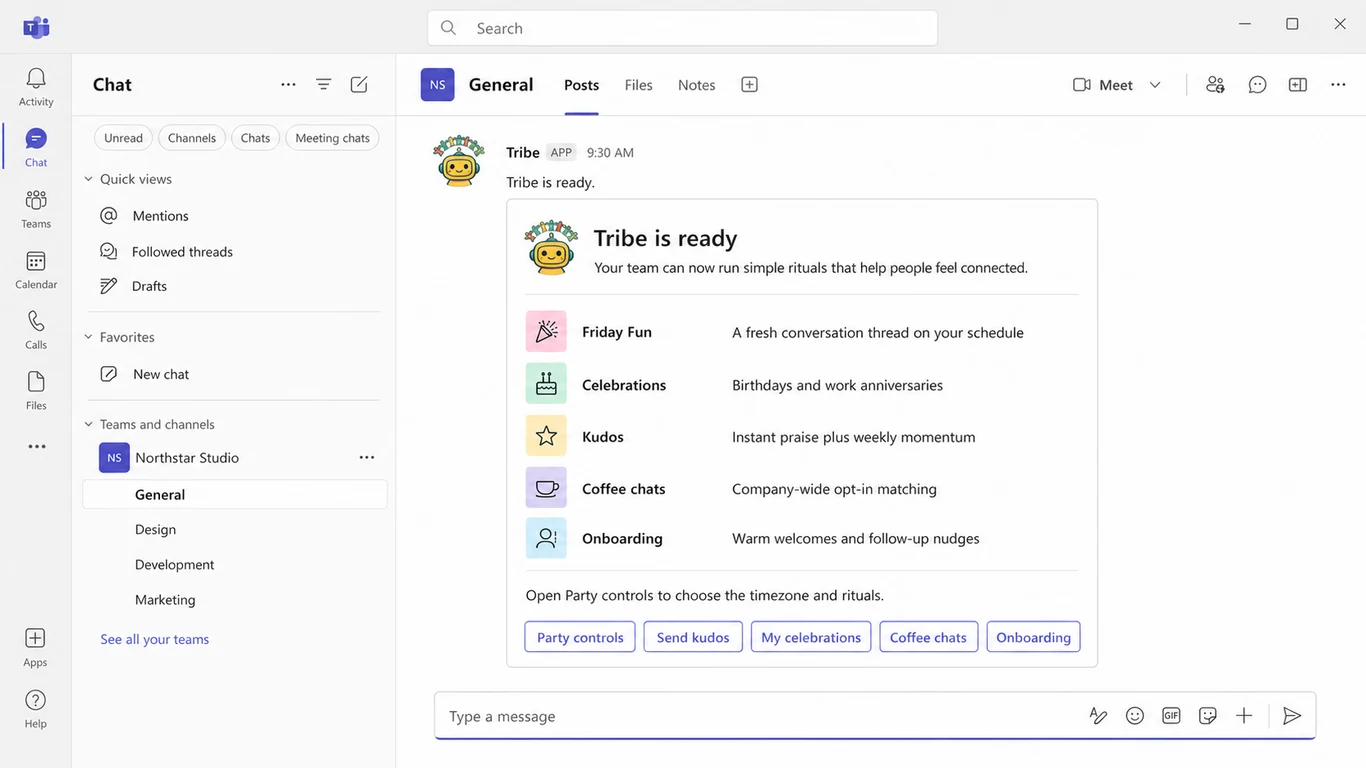
The catch: no Outlook calendar integration yet (calendar automation is Google-side today; Teams and Slack members still get the universal calendar link), and if you want a formal HR program with HRIS sync and program-level reporting, the enterprise tools below go deeper. For actually getting teammates talking — on whichever platform your company uses — this is the option we'd pick even if we hadn't built it.
2. Donut — the famous one (Slack, mostly)
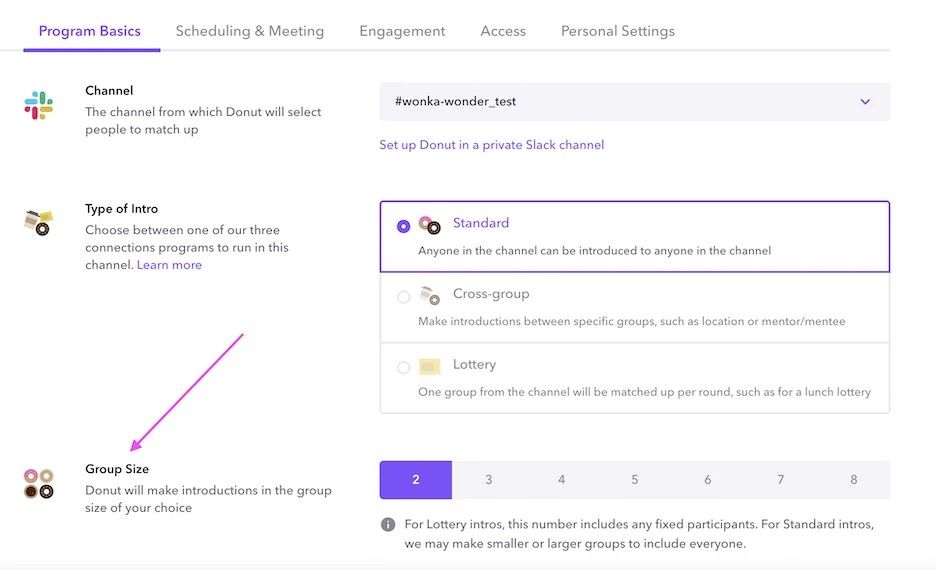
Donut made this category mainstream and its Slack intros are still polished: pairing, watercooler prompts, and onboarding journeys, with a free tier covering intros for up to 24 people in one channel. Paid Slack plans start at $74/month billed annually and scale with active usage (see our full Donut pricing breakdown). The Microsoft Teams version is narrower — intros with Outlook scheduling — but Donut currently prices that Teams plan at $0. There is no Google Chat app. Check Donut's current pricing.
3. CoffeePals — the Teams-first specialist
If connection programs are a funded HR initiative in a Microsoft shop, CoffeePals is one of the deepest tools: 40+ programs spanning coffee matching, mentorship, onboarding buddies, weekly questions, shoutouts, and automated birthday, anniversary, and new-hire moments. It also offers advanced matching rules, HRIS integrations, and SOC 2. Free covers up to 24 active users; Pro starts at $45/month annually for up to 25 active users and climbs in bands. The catch: pricing gets serious at scale, and conventional peer-to-peer kudos may still call for a dedicated recognition tool. Browse CoffeePals' current programs.
4. RandomCoffee — HR-run programs on a budget
RandomCoffee is program-management software HR runs (email at the core, Slack/Teams integrations for delivery), with a free tier for one program of up to 20 people per session and Pro from $19/month for up to 25 users. Good for structured, HR-owned campaigns; less good if you want a bot that just lives where the team chats.
5. Dewdropz and LEAD.bot — the Teams mid-market
Dewdropz (Teams-only) pairs coffee with a watercooler prompt channel at $3/active user/month with a $49 minimum. LEAD.bot starts at $49/month for pulse, watercooler, and celebrations; teammate matching starts on Standard at $59, while onboarding and buddy programs start at $99. Both are credible if your world is Teams-only; neither helps a mixed-platform org. See LEAD.bot's plan breakdown.
6. Mystery Coffee and the Microsoft template — the edges
Mystery Coffee (Mystery Minds) runs enterprise matching programs over email with chat-app notifications — built for thousand-person organizations, sales-led, custom-priced. Microsoft's Icebreaker template pairs Teams members weekly for free, if your IT team deploys and maintains it on your own Azure subscription — free software, not a free product.
Getting the ritual right (whatever bot you pick)
- Start biweekly. Weekly matching burns busy people out; monthly loses momentum. Biweekly is the proven default — tighten later if demand is there
- Keep it opt-in. Mandatory fun isn't. A voluntary program with 60% participation beats a mandatory one that everyone resents
- Pairs first, mixers later. 1:1s are lower pressure for introverts; groups of 3–4 work once the ritual is established
- Let the leader go first. When a founder or director visibly opts in and posts about a match, participation follows
- Give the first message away. Shared interests or a built-in icebreaker in the match message removes the awkward opener — the #1 silent killer of matched chats
Conclusion
Choose for the ritual you actually need. Tribe is the strongest cross-platform choice when coffee chats are one part of a broader culture program; CoffeePals is the deeper Teams-first coffee suite; Donut remains the mature Slack option, while its Teams intros plan is free and narrower. Start biweekly, keep participation optional, and judge the tool by completed conversations rather than matches sent.